Wallet & Getting Started#
Ethwei uses standard Cosmos wallets. Keplr is the recommended wallet, available as both a desktop browser extension and a mobile app.
1. Install Keplr#
On a computer — install the Keplr extension for Chrome / Brave or Firefox.
On mobile — install the Keplr app from the App Store (iOS) or Google Play (Android).
Create or import a wallet and back up your seed phrase.
2. Add Ethwei Testnet#
There are two ways to add Ethwei Testnet — pick whichever is easier.
Option A — Search inside Keplr#
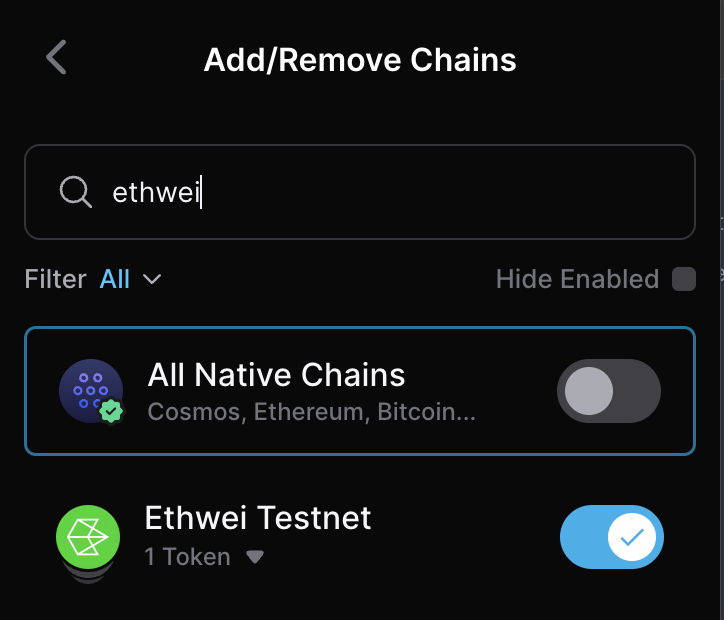
On a computer — open the Keplr extension, click the menu (☰) at the top, choose Add/Remove Chains, search “Ethwei Testnet”, and toggle it on.
On mobile — open the Keplr app, tap the menu (☰), choose Add/Remove Chains (Manage Chain Visibility), search “Ethwei Testnet”, and toggle it on.
Option B — One-click button#
On a computer — click the button below. Keplr will ask you to approve the network. Accept, then switch to Ethwei Testnet inside Keplr.
On mobile — open this page from inside the Keplr app’s built-in browser (Keplr → Browser tab,
then enter docs.ethwei.com/docs/wallet), then tap the button below. Mobile Safari and Chrome
can’t talk to the Keplr app directly, so the button only works from Keplr’s in-app browser.
Track your transactions and staking history on the Ethwei Testnet explorer.
3. Get testnet tokens#
Testnet faucet: coming soon. In the meantime, ask in the community for testnet ETE.
Mainnet#
Mainnet coming soon.Mainnet has not launched yet. This button will go live once mainnet is available.
Address format#
All Ethwei addresses start with ete. Example:
ete1qv2scq5r3qws0gu3h0e7h9c7m2t7h5m0zgm5xqYour Keplr address for Ethwei Testnet appears under the Keplr icon once the network is added.